
Security-deposit hold expiry and renewal
Understand hold deadlines, approval and automatic renewal, renter consent, and what to do when coverage needs attention.
A security-deposit hold reserves money on a renter’s card. It is not a rental payment, and it can expire while the vehicle is still out. Renewing it requests a new hold; it does not charge the deposit or add to the rental total.
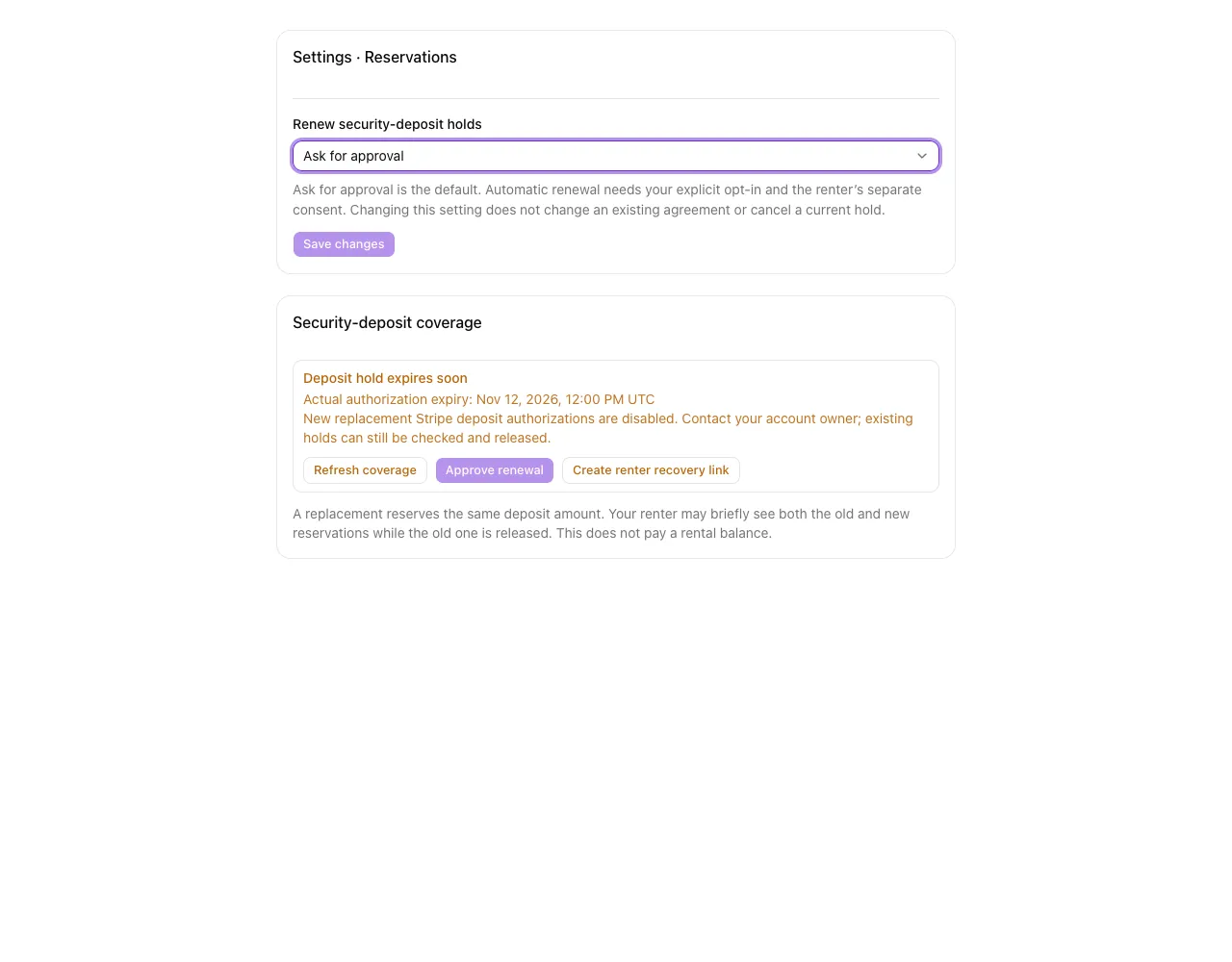
Choose how renewals are requested
The business owner opens Settings → Reservations → Renew security-deposit holds, chooses a mode, then selects Save changes:
- Ask for approval is the default. Review an expiring hold on the booking before requesting renewal.
- Automatic — explicitly opt in requires an explicit choice. RentalPilot may request a replacement before the current hold expires and flags failures that need attention.
Routine monitoring and automatic renewals run in batches every 12 hours. For a standard authorization window, an eligible automatic replacement is normally requested with 12–24 hours remaining before the confirmed expiry. Approval mode flags holds for you to review; it does not approve a replacement for you. A batch can continue across checks when there are many rentals to process.
Pending requests, releases, uncertain coverage and holds approaching expiry are checked every 15 minutes. Short authorization windows may need renewal between routine batches. These checks use the confirmed deadline and do not request a new hold on every check. A decline or bank-authentication requirement still needs attention; the schedule does not guarantee uninterrupted coverage.
Both modes need a saved card and the renter’s applicable consent to repeated deposit authorizations. Approving a renewal yourself does not replace that consent. Changing the business policy does not rewrite an existing signed agreement. Selecting Automatic does not guarantee that the bank will approve a replacement or that provider renewal is available for your account.
Read the booking’s coverage
Open the booking’s Security deposit hold section for its coverage status and confirmed deadline. Deadlines vary by card and provider; do not assume every hold lasts seven days. A missing or unknown deadline is not verified coverage. A new hold after expiry cannot cover the earlier gap.
Use Refresh coverage to verify the original authorization’s latest state, including when scheduled monitoring is unavailable. Refreshing does not request a replacement. If renewal is available, review the amount and disclosure before selecting Approve renewal. If new Stripe authorizations are disabled, the panel explains this and the approval button stays disabled. The new hold is confirmed before the old one is released. Both reservations may temporarily appear on the renter’s card, reducing their available funds until the bank processes the release. Warn renters about that possible overlap.
Retry a recorded capture
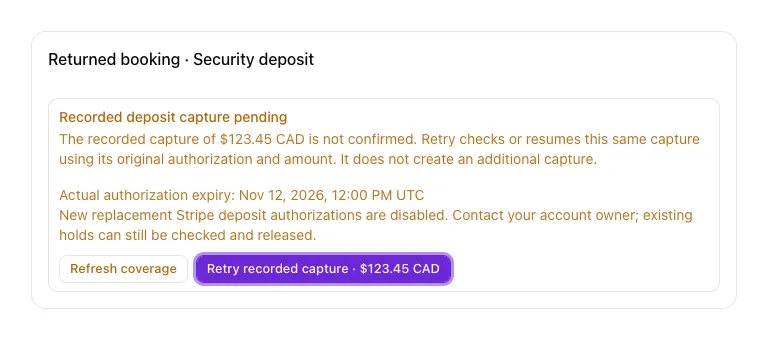
If Recorded deposit capture pending appears, check the original amount and currency shown beside Retry recorded capture. This action checks or resumes the capture already recorded for that booking. It can finish that original capture if it was not sent, or confirm its result if the bank already captured it. It uses the same authorization and amount; it does not create an additional capture or let you enter a different amount.
Select Retry recorded capture · [amount] explicitly. The button is disabled while the request is running. A pending response or an error does not confirm settlement: keep the issue open until Deposit captured appears and the booking’s payment records refresh. If another request is still running or the result remains uncertain, wait before retrying. Refresh coverage checks authorization state; it does not resume a recorded capture.
This retry remains available after the vehicle is returned and when replacement authorizations are disabled. It does not enable the ordinary capture action for an unverified hold. If the original recorded amount is unavailable, no retry button appears; refresh the coverage and review the booking before taking another action.
If a release was recorded but is still pending, use Retry recorded release on the booking. This resumes the same recorded release, including after the booking’s coarse deposit state changes to released. It does not create a capture. Keep the issue open until the release and booking records are confirmed.
Completing check-in can save the physical return while deposit settlement still needs attention. Vehicle returned · deposit settlement needs review means the vehicle is back; it does not confirm that a capture or release finished. Open the booking and resolve the recorded operation. A confirmed capture shows the actual captured amount and original currency, which may be less than the initial hold.
When a hold needs attention
- Expiring or expired: open the booking and review its current coverage. Ask for approval mode needs an authorized operator request.
- Renter authentication required: select Create renter recovery link and share the secure link with the renter. They review the disclosure and consent, and may need to complete their bank’s authentication or supply another card. Opening the link alone does not authorize a hold. A saved card alone does not guarantee approval.
- Declined or unavailable: contact the renter and review the booking. Do not assume the old hold still covers the deposit.
- Unknown or release pending: keep the issue open until the outcome is confirmed. Avoid repeated requests that could reserve funds again.
Reading a notification does not repair the hold. A recorded return stops future renewal requests; any unresolved release or settlement still needs attention.
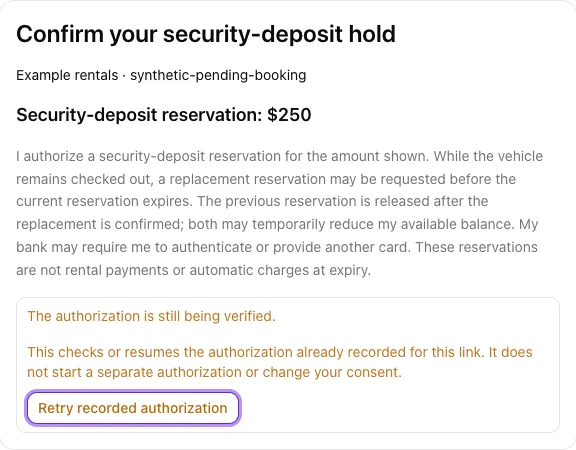
If a replacement is declined, the renter reviews the deposit permission again, ticks the consent box and enters their name before trying another card. When an authorization already recorded for the recovery link remains pending, the renter can explicitly select Retry recorded authorization. This checks or resumes that same recorded request; it does not start a separate authorization or change their consent. An active request or uncertain result stays pending. Status reads alone do not resume it. If bank authentication is still required, continue through the existing link and explicitly review consent before resuming that authorization. Check authorization status remains a read-only option when an authentication or status read fails.
Renewal uses the same operator payment account as the original hold. Connecting a different Stripe account does not move an existing hold or saved card to it. Provider availability and fees depend on the account, card network and pricing; a released hold is not a refund, but there is no blanket promise that authorization or reversal is free.
For initial holds and return settlement, see Deposits & refunds.