
Review retained sources, export renter data and remove selected values
Review individual setup values, download scoped renter data and remove selected source values while preserving unrelated history.
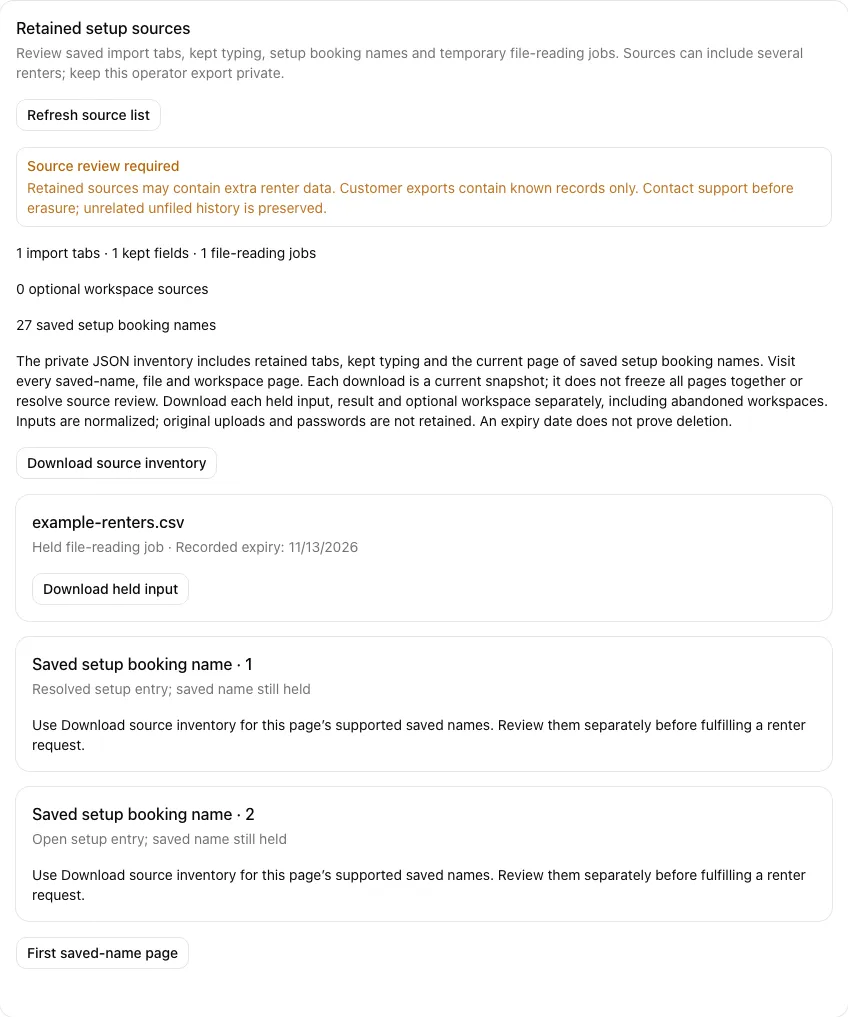
Only the account owner can export retained setup sources. Open Account → Data & privacy → Retained setup sources, then choose Review retained sources. This reads the saved sources without sending them to AI or deleting anything.
Download the operator’s source data
Choose Download source inventory for a JSON file containing retained import tabs, kept typing, the current page of saved setup booking names and file-reading metadata. This can contain several renters’ personal information. Keep it private and do not send the whole operator file to one renter.
Download each available held input and held result separately. Inputs contain the normalized content extracted from a file, rather than the original uploaded file. Original uploads and file passwords are not retained. Use Next source page until you have visited every page; download each page’s inventory when there are several pages. The main Export data download also includes retained tabs, typing and the first page of source metadata; it does not bundle the separate file attachments.
A recorded expiry date does not prove a held source was physically deleted. If a reference or download needs review, contact support. A failed download does not remove the source or mean the export is complete. Refresh the list if a source changed while you were reading it.
Optional workspace typing
If the inventory lists Optional setup typing, download each workspace’s typing separately. Visit Next workspace source page until every workspace page has been reviewed. Abandoned workspaces can still hold personal information: abandoning a workspace, disabling onboarding or a failed download does not erase it.
Workspace files include held typing and any unsupported saved progress that needs review. They normally exclude recognized internal autosave and retry keys; the unsupported-source exception below preserves data that cannot safely be classified. Contact support if a source is unsupported or unavailable. An older inventory may show a legacy notice that additional workspace data is held outside its export; that notice still requires source review.
Fully recognized autosave queue metadata is excluded. If saved ordering content uses an unsupported format or record reference, its potentially personal contents are included privately under unsupported ordering source rather than silently omitted. That unsupported content may include client-generated queue identifiers; these do not grant account access. Keep this whole-operator source file private and review it with support. Do not forward it as an individual renter’s export. Abandonment, disabling onboarding and a failed download do not remove it.
Saved setup booking names
The inventory counts names kept on setup booking entries, including open entries, resolved or converted entries, and entries for retired cars. Resolving an entry or importing its booking does not remove that saved name. RentalPilot does not guess which customer a name belongs to.
Use Next saved-name page to visit every page of up to 25 entries. Choose Download source inventory on each page for its supported saved names and entry details. The file, workspace and saved-name page controls are independent. Each download is a current snapshot; refresh and download again if records change during your review. The download does not resolve source review or erase anything.
Unclear or oversized legacy entries can require support review. They remain counted and held even when the inventory cannot include their full values or reach every following page. An older inventory that cannot confirm saved-name coverage is also incomplete; refresh or contact support rather than treating it as empty.
A renter’s access request
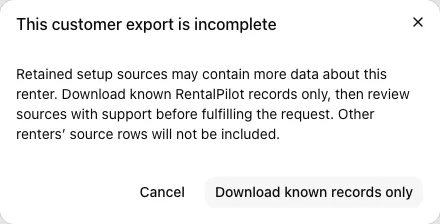
Open the customer’s profile and choose Export data. When setup sources may hold extra personal data, RentalPilot explains that the export is incomplete. You may cancel or explicitly choose Download known records only. That file contains the customer’s known RentalPilot records and a source-review notice; it excludes unrelated renters’ source rows.
Review individual source values for a renter
In the customer profile, find Additional renter data and choose Review additional sources. Check the renter’s name and email shown with each page. Choose a retained source and visit every page. The screen shows individual cells, kept fields, saved setup booking names and source labels; it does not guess who a name belongs to.
Choose Start source review when prompted. Starting keeps every value and classifies nothing. Other open setup, import and customer-edit screens must reload before saving. Keep any unsaved typing on those screens until you have reviewed it; an old screen must not restore data removed by cleanup.
Imported and historical bookings remain usable after source review, but check-out does not rewrite their agreement history. A manager override can let the handover continue with an unresolved agreement; it does not mark that agreement signed. The check-out signature stays with the check record. Use Record signed agreement from the current booking view only when the renter has actually signed. Once source-review protection is active, customer Edit is shown only when the current account view includes customer-record permission. If that permission disappears, the open editor closes; reload the current profile before editing again.
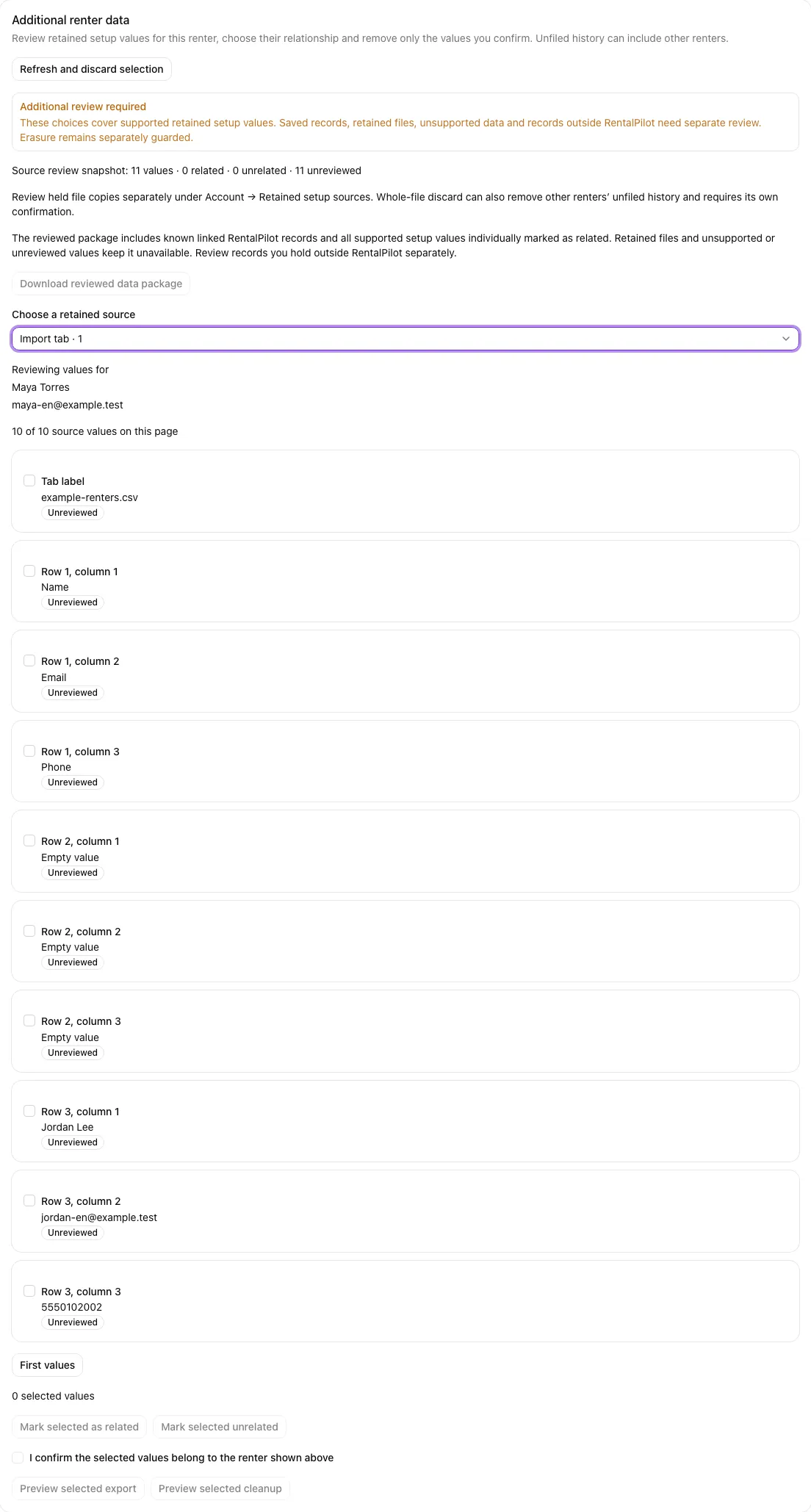
Select individual values and choose Mark selected as related or Mark selected unrelated. Review each value, including labels and headers, instead of assuming a whole file belongs to one renter. These choices apply only to the exact current renter and source values. They do not remove anything. Unsupported values and held file copies still need support review.
If the renter, source or permission changes, the screen keeps your displayed choices and blocks further actions. Use Refresh and discard selection, then review the current values again. Refresh does not carry earlier choices to changed data.
Download selected values or a reviewed package
For a small source-only download, select values, tick I confirm the selected values belong to the renter shown above, and choose Preview selected export. Check the renter and every selected value in the dialog, then choose Download selected values.
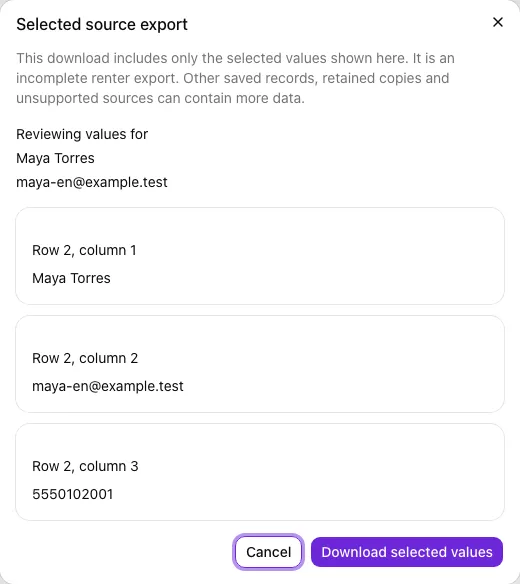
This file is an incomplete renter export: it contains only the selected values. It does not include all saved records or retained copies. Keep it private.
Download reviewed data package becomes available only after every supported value has an individual related or unrelated choice and no unsupported or held file data prevents the package. It combines known linked RentalPilot records with supported setup values marked as related. Unrelated source values are excluded. The file states its coverage; review records you hold outside RentalPilot separately before fulfilling the request. A reviewed package does not confirm erasure.
Remove selected source values
Select only the values you intend to remove, confirm that they belong to the displayed renter, and choose Preview selected cleanup. The dialog lists each value and its exact action, such as clearing a cell or removing a kept field. Check this list, then choose Remove these source values. Other cells, unfiled history, saved bookings and financial records remain.
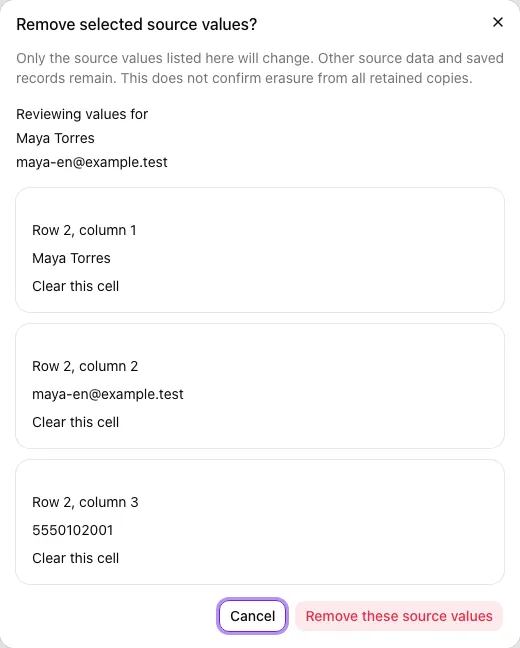
Cleanup invalidates earlier source-review choices. Review the remaining current values again before downloading a reviewed package. If the selected values are already clear, nothing changes. A failed or changed preview requires a fresh review; it does not prove removal.
Review held file copies separately
Under Account → Retained setup sources, eligible file-reading jobs offer Review whole-file discard. This is a separate action that can remove other renters’ unfiled history in the same file. Review the warning and confirm Discard entire file only when you intend to discard that whole copy. Saved bookings and financial records are kept.
A removal request can remain pending until physical removal is confirmed. Refresh the source list to check its state. Unsupported, legacy or still-processing copies remain held for support review. Discarding one file does not complete a renter export or erasure.
A renter’s erasure request
Anonymise customer record is a separate, irreversible action on that customer record. Its confirmation and success message do not prove that every linked record or retained copy was removed. A linked-file attempt count reports removal attempts; verify the remaining files and other copies separately.
RentalPilot continues to block erasure while retained sources, file copies or saved setup booking names need review. Selected cleanup, classifications and downloads do not override that guard or confirm erasure from every retained copy. Other renters’ unfiled history is preserved. Contact support for remaining source, file and record review before reporting the request complete.