
Understand your brand colour
Learn why RentalPilot may adjust a pale brand colour or its text contrast while keeping your original choice saved.
Your brand colour appears across your setup, admin and public booking site. Choose it while adding your logo, or edit it later in Settings → Booking site.
When RentalPilot adjusts the display
Pale colours can make button labels, links and icons difficult to read. If your choice needs more contrast, RentalPilot shows a quiet note beside the colour control and adjusts the displayed shade or text colour where needed.
The exact treatment depends on the booking-site theme. A light theme can use a darker shade with light labels. A dark theme — including Auto when the visitor uses dark appearance — can keep or lighten the shade and use dark labels instead.
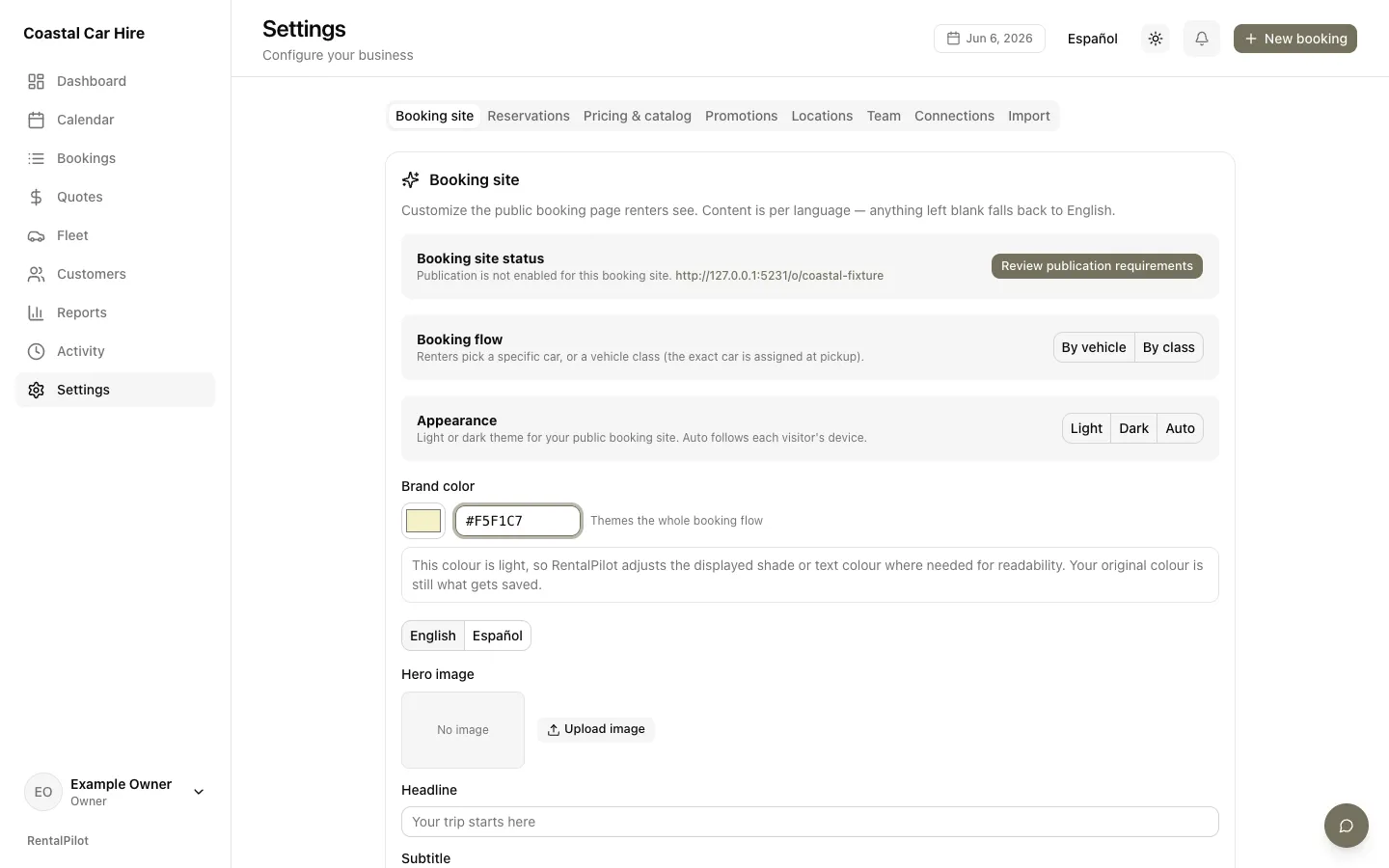
This is a display adjustment only. Your original hex colour remains in the field and is the value that gets saved. Darker choices do not show this pale-colour note.
Change or keep the colour
You can either:
- keep the pale colour and select Save changes; RentalPilot will preserve it and apply the readable shade or text contrast required by the active theme, or
- choose another colour; the note updates immediately as you edit.
The same guidance appears when you choose a colour during setup. It does not block confirming your logo or continuing setup.
For all booking-site appearance options, see Customize your booking site.
Questions? Contact us.